
|
|
|
|
|
|
|
| Big Tip:
Netscape's |
|
This
Page was Last Updated: 11/03/98
|
||
|
|
|
|||
|
Links--
|
|
|
|
e-mail the Internetthe WWW |
|
The Missing LINKs |
DB-9, DB-25, Cables |
Oh... I feel Faint...
What in the HELL does All This Mean? MODEM Settings PORT Settings Network Preferences |
|
Try a Quick Fix |
Definitions |
Head Off Trouble
Maintenance Tips |
Windows 95 Tips |
Network Layers Ever
Wonder What
.. PPP SLIP TCP/IP IP DNS ISP ... Means |
 |
Network, Layers |
 |
|
|
| Some companies maintain a network that is linked
to the Internet via dedicated communication lines. Those with less resources,
including most individuals, access the Internet through an Internet
Service Provider, a company that offers use of its dedicated communication
lines.
If you have a modem, you can dial up a service provider whose computers will connect you to the Internet. Dial-up access means that the modem on your computer can log in to another computer that is hooked up to the Internet. The most popular dial-up access alternatives are shell accounts and SLIP/PPP accounts. When using a shell account, you dial into a service provider's computer and use the Unix operating system to indirectly connect to the Internet. With an indirect connection, your computer does not interact with Internet computers. In many cases, when you download a file from an Internet site, the file is saved on the service provider's computer rather than on your computer. You then have to transfer the file from the service provider's computer to your home system. Shell accounts, while limited in features, have historically been less expensive than direct access accounts. When using a SLIP or PPP account, you dial into a service provider's computer and run applications that directly connect to the Internet. With a direct connection, your computer can use browsers with user-friendly graphical interfaces to interact with Internet computers. A direct connection lets you download files directly to your system from remote sites. SLIP or PPP access to the Internet offers more performance and convenience than a shell account.
About SLIP and PPP
An Internet Service Provider might offer SLIP, PPP, or both. Your computer needs to use connection software (usually provided by the service provider) that matches the protocol of the server's connection software. PPP is a more recent and robust protocol than SLIP.
CSLIP Compressed Serial Line Internet Protocol, is a version of SLIP that supports compression.
Dynamic SLIP & Static SLIP When you use a SLIP or PPP connection to the Internet, your service provider's server identifies your computer by providing you with an IP address (e.g., ). Using dynamic SLIP, your computer is dynamically allocated a temporary IP address (just for the immediate session) from a set of IP addresses maintained by the server. Using static SLIP, your computer is allocated a one-time, permanent IP address (when your account is set up) for use across sessions. Static SLIP means you have a static IP address. FTP File Transport ProtocolBy accessing a page whose URL begins with ftp, you can navigate folders/directories, view files (including HTML and image files), download software, and upload software. Note that you need "write" privileges to the FTP server (permission granted from the site) to upload files. |
Local Host That's You. Your PC, MAC, Workstation, etc. Dial-Up Modem to Modem over a "switched connection," i.e., Dial up telephone lines. ISP Internet Service Provider, e.g., Bell, MCI, AOL, mindspring, etc. TCP/IP Transmission Control Protocol/Internet Protocol. This is the standard communications protocol required for Internet computers. To communicate using TCP/IP, A PC needs a set of software components called a TCP/IP stack (a stack is built into Windows 95). The Mac OS typically uses a proprietary software called MacTCP. Most Unix systems are built with TCP/IP capabilities. TCP/IP Stack
Winsocks
DNS (Domain Name Service) Sometimes referred to as the BIND service in BSD UNIX; a static, hierarchical name service for TCP/IP hosts. A DNS server maintains a database for resolving host names and IP addresses, allowing users of computers configured to query the DNS to specify remote computers by host names rather than IP addresses. DNS domains should not be confused with Windows NT networking domains. For example, issuing the "ping ftp.microsoft.com" command goes to the DNS server you specified, looks up the IP address for the site, and then pings that IP address. PPP (Point-to-Point Protocol) An industry standard that is part of Windows 95 Dial-Up Networking to ensure interoperability with remote access software from other vendors. It allows you to use the IPX, TCP/IP, and NetBEUI protocols over a standard telephone line connection. SLIP (Serial Line Internet Protocol) Another industry standard that is part of Windows 95 Dial-Up Networking
to ensure interoperability with remote access software from other vendors.
Unlike PPP, SLIP works with only one protocol. Windows 95 works with TCP/IP
over a standard telephone line connection.
PAP (Password Authentication Protocol) This is an authentication method that can be used when connecting to an Internet service provider. It allows you to log in without having to use a terminal window. Using PAP, passwords are sent over the circuit in text format, which offers no protection from playback. CHAP (Challenge-Handshake Authentication Protocol) This is another authentication method that can be used when connecting
to an Internet service provider. It also allows you to log in without having
to use a terminal window. However, it does not send passwords in text format
and is more
|
| Gateway |
| When you dial-in to your service provider--MCI, Bell_South, Mo's Grocery,
Storm Door Repair & Internet Provider, etc., your MODEM connects with
one of dozens/hundreds of MODEMs at the service provider's location (local
number).
After the two MODEMs agree on a baud rate that gives the best speed with the least errors, the DATA from your computer and their computer--called a "Server" (it serves) are exchanged for username & password verification. Once your computer in logged on (login, connected, logged on), you can now do one of two things (three if you count "news groups"). |
| You can either check and/or send your e-mail
or you can go straight to the Internet/WWW.
|
| If you want to check your e-mail:
You would login a second time, this time to your service provider's Mail Server. A Mail Server is a computer that acts like a mail box, it holds messages sent to you. Likewise, when you compose a letter, and then "mail" it, your Mail Server receives your letter, looks up the addressee's Mail Server, checks out the route(s) to that server, and then sends it on its way. And, of course, when it arrives at the destination's Mail Server, it is stored as a file waiting to be "downloaded" by the addressee. There are variations to the above, but to avoid confusion, and making this stop being fun--we'll move on. |
| To go to the internet:
You send the address of the Internet/World Wide Web location you desire, to the service provider's Internet Server in the form of an Internet address called a URL (Universal Registration Location): As you can see there are basically three parts to the URL.
Some of the forms URLs can take:
The Home Page:
Test these LINKS: ( Remember, to Return, point & Click on the Browser's BACK Button )
HTML stands for Hyper-Text Markup Language. Hypertext is a very intuitive approach to reading a document or book; it allows you to go directly to referenced information in the text body--read it and--then return to the original text without getting lost, and with a minimum of confusion. This is something a book cannot do! |
|
|
|
 |
 |
| Windows Machines: | ||
| MS-DOS .xx | MS-DOS ( 7 ) | MS-DOS ( ? ) |
| Windows 3.1
(Windows 3.11 for Work Groups) |
Windows 95 | Windows NT |
|
|
PORT Settings |
|
|
9,600 baud
|
Speeds:
[?] Slow
Serial I/O
[?] Fast
Serial I/O
|
Examples: RAM Cache Size = 2,000 kbyte Disk Cache Size = 5,000 kbyte |
| []
COM
PORT Addressing
COM1 IRQ = 4 Mouse
(typical)
COM2 IRQ = 3 MODEM
(typical)
COM3 IRQ = 4 IOAddress = 03E8 COM4 IRQ = 3
|
[?]
Numbers
of Connections = 1 - 4
[?] Network Buffer Size: 4 to 32 kbytes |
|
[?] D e f i n i t i o n s [?] |
| MODEM
Speed
The MODEM Speed is the speed that both MODEMs agree upon to communicate between the Computer and the Network server. If telephone line conditions are not ideal: both MODEMs will "drop-back" to progressively slower and slower speeds until the number of errors is acceptable. The speed will be indicated in the "Connection Window." |
| COM
PORT
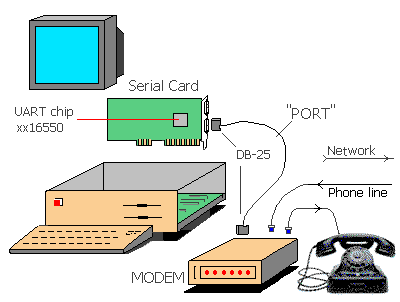
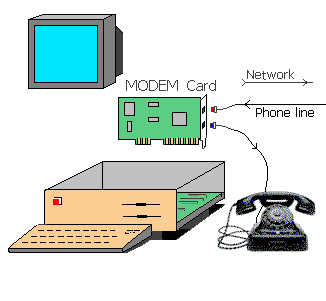
The PORT Speed is a measure how fast the Computer can accept DATA from the MODEM. Port speed should not be slower than the MODEM speed. In the Ideal situation: the Port Speed will be set to Maximum (e.g., 115-kbps). External MODEMS: The Maximum speed will be limited to the Serial UARTChip used in the Serial I/O card. If your UART is the slower, xx16450x, it would be a good idea to upgread your Serial I/O to a card that uses the faster xx16550xx UART. Internal MODEMS: (ones that plug into the Computer) The Maximum speed is usually limited by the MODEM Card itself. (the exception might be a slow 386 machine, etc.) Suggestion: When considering the purchase of a new MODEM, look for a MODEM that can be Up-Graded via software, i.e., 28.8-kbps to 33.3-kbps to 56,6-kbps (the latest, "X2," standard: 28.8-kbps out to the server, and 56.6-kbps from the server). |
| NOTES:
(1) I/O means Input/Output (2) U A R T stands for Universal Asynchronous Receive & Transmit (3) M O D E M stands for MOdulation-DEModulation (4) |
COM PORT Addressing:There are Three Things to Remember about COM PORT Addressing--"And Nobody Knows What They Are!"Generally the Following are True: (1) There are Four Serial Ports on the PC. (2) These are designated COM1, COM2, COM3, COM4. (3) These COM PORTS are "enabled" by signals called IRQ (Interrupt ReQuest) Lines. (4) There are many IRQ lines that are used to control various functions in the PC (floppy drive, hard drive, printer port, mouse, etc.), but typically only two are used to enable COM1, COM2, COM3, Com4 (5) If you are still with me: COM1 & COM3 use IRQ4; COM2 & COM4 use IRQ3. |
| OK, we're closing in on it!
The computer needs to address it's PORTS, (Serial, Parallel, IDE, SCSI, etc.). Since it already has to addresses Memory, it treats the ports as small sections of Computer Memory. This is called Memory Mapped I/O, (MMIO). It turns out that the serial ports COM1- 4 have unique MMIO addresses. Though they can be set to a range of addresses: Typically they are set to the following: COM1 = 03F8(hex) COM2 = 02F8(hex) COM3 = 03E8(hex) COM4 = 02E8(hex) |
| Examples of I/O Settings
COM1 = IRQ4 = 03F8 COM2 = IRQ3 = 02F8 COM3 = IRQ4 = 03E8 COM4 = IRQ3 = 02E8 |
|
[Computer DB-25-M ]---> >---[ DB-25-F Cable DB-25-M ] ---> >---[ DB-25-F MODEM ] [Computer DB-9-M ] ----> >----[ DB-9-F Cable DB-25-M ] ---> >----[ DB-25-F MODEM ] |
| Cache |
| The Number of Connections your Browser can handle simultaneously: 1 - 4 |
| Buffer Size:
The larger the Buffer the Faster your system can run--all else being equal. However, if the Buffer is too large for your machine's Bus speed, it will end up Slowing your system. If in doubt, make incremental changes: log the connection speed over several sessions or days, and change the Buffer size and repeat. |
|
|
| Problems Making ?
If you are experiencing problems making a reliable connection: Netscape 2 & 3, go to Network Options (in Preferences), set the number of connections to 1 and the buffer size to 8k. If this helps, read the paragraph on Buffer Size. |
|
It really is Faster and Less Painful, than the Alternative(s). Sharp Sticks Included! Windows 3.1:
Windows 95: 1) Do Not re-install MS-DOS, WIN95 already has MS-DOS 7.xx
16 bits verses 32 bits
|
Maintenance Tips |
|
Look in: [START] Programs / Accessories / System Tools / ScanDisk 1) Run a utility called "ScanDisk," when Windows is first booting up. This utility will check the Health of your Hard Drive and its partitions. If it finds corrupt files or folders (directories) it can repair them before valuable information is lost or your system gets corrupted and crashes. "ScanDisk," can be made a part of your Windows Start Up sequence. |
| Look in: [START]
Programs / Accessories / System Tools / Disk
Defragmenter
2) A second useful utility is "Disk Defragmenter."
A fragmented disk partition means that parts of the file or program you are loading, are spread over many locations on your hard drive--increasing the time it takes to load these files. Remember, a hard drive is mechanical and is relativity slow, compared to the other parts of your computer. If the file is contiguous, i.e., all at one physical location (same track, etc.) on the disk it will load much faster. When running Disk Defragmenter, you will get a message indicating the amount of fragmentation found, and it will suggest a course of action. |
| NOTE:
The term partition , as in "disk partition" means: 1) Your computer can have one or more Hard Disk Drives (A.K.A., fixed disk, hard file, Winchester disk, etc.). 2) PC drives are designated in sequence: A:, B: (floppy drives), C:, D:, E:, F:, etc., referred to as Logical Drives. 3) If you have only One Hard Drive, it can have one or more partitions: If you have, say, a single hard drive with 3 partitions, each partition will have the same designation as if you had 3 separate Hard Drivers (virtual drives) C:, D:, & E:. |
| An Alternative:
Consider purchasing and installing for Windows (Windows 3.1x, version 2.0 for Win95). More on this later... |
Windows 95 Tips |
|||
|
(2) When Changing--one or more--Settings: Write
Down Old
(3) Make ONE (1) Change at a time! (4) --Test it--reboot and try! (5) Then proceed to the next... |
|||
TASK BAR-- Programs*Accessories* System Tools: Run Scandisk & Run Defragmenter.(Having Scandisk run at startup is a good idea, it will catch disk errors before they can cause a progrom/system crash!) (2) Change your machine from Desktop Computer to a Network Server:
(3) TASK BAR-- Settings: Control
Panel * Network*
TCP/IP*
IP
address TAB: (
)"Obtain an IP address automatically"
|
Suggestions are Solicited, P l e a s e !
